App Store Launch Checklist: Before You Submit to Apple

Divv Saxena
Founder & Flight Director •
On this page
Quick answer
An App Store launch needs four things ready before you press submit: a developer account, a complete product page (name, subtitle, screenshots, description, keywords, privacy details), the information App Review asks for, and a release plan. This checklist covers each with Apple's current limits.
To launch on Apple's App Store you need four things ready before you press submit: a developer account, a complete product page, the information App Review asks for, and a release plan. Miss one and the app sits in review or gets sent back.
This checklist goes through each in order. Every limit and number comes from Apple's developer site, linked beside it (checked 17 Nov 2026). It covers iPhone and iPad apps on Apple's App Store. It does not cover Google Play.
1. Account and setup
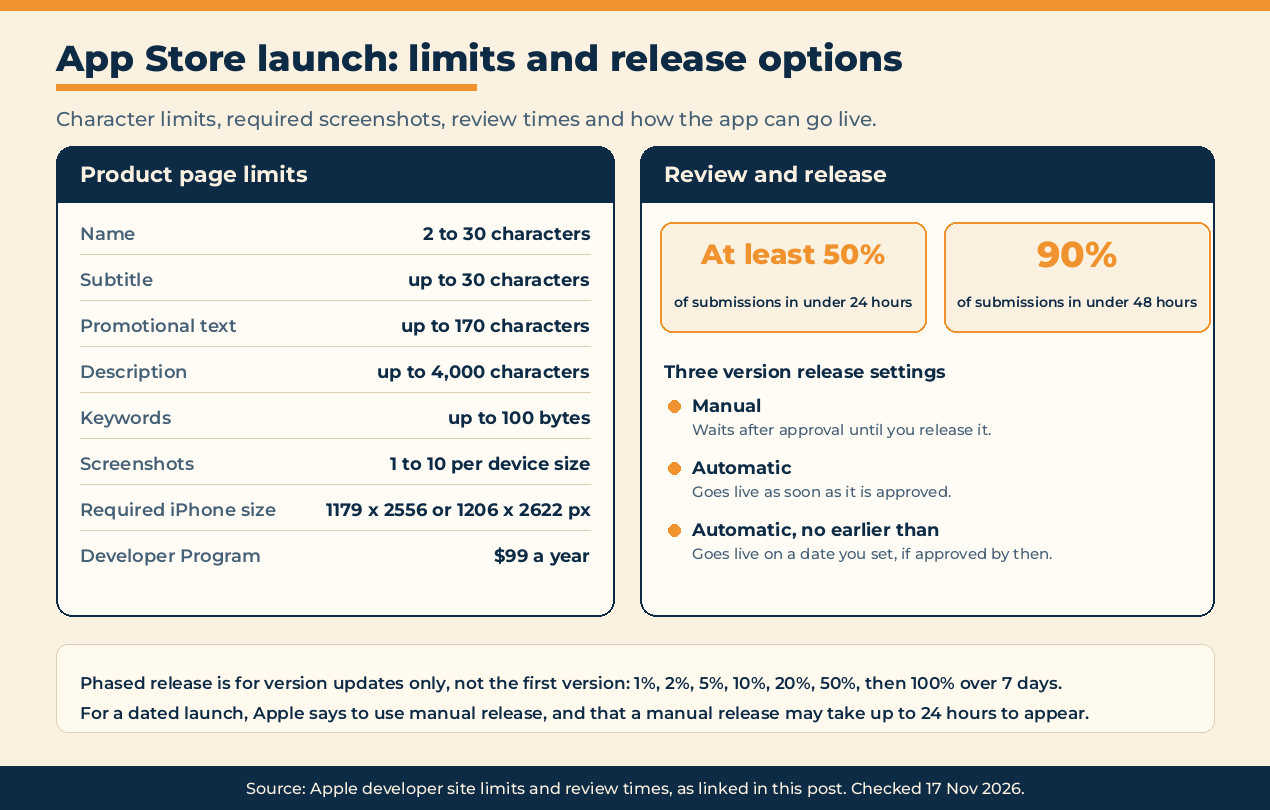
- Join the Apple Developer Program. Apple lists it as a $99 annual membership on its program page (checked 17 Nov 2026).
- Choose the bundle ID carefully. Apple: "You can't change this property after you upload a build."
- Choose the SKU. It is your internal ID, customers don't see it, and you can't change it after you add the app.
- Put up a support page and a privacy policy. Both URLs are required, and the support URL must lead to real contact information.
2. The product page
Limits are from Apple's app information and platform version information references (checked 17 Nov 2026).
- Name: 2 to 30 characters.
- Subtitle: up to 30 characters. It appears under the name.
- Promotional text: up to 170 characters. You can change it without submitting a new version.
- Description: up to 4,000 characters, plain text. Required.
- Keywords: up to 100 bytes. Required. Apple says not to repeat your app name or company name, since the app is already searchable by those, and that names of other apps or companies aren't allowed.
- Support URL: required.
- Marketing URL: optional.
- Copyright: required.
- Primary category: pick the one that best describes the app.
- Age rating: required. You answer a questionnaire and Apple assigns the rating.
- What's New text: not available for the first version. Required for every update after it.
3. Screenshots and previews
From Apple's screenshot specifications (checked 17 Nov 2026):
- At least 1 screenshot, up to 10 per device size.
- Formats: .jpeg, .jpg or .png. No alpha channels or transparency.
- Required for iPhone: at least one screenshot for "iPhone with Dynamic Island (medium display)". Accepted sizes are 1179 x 2556 or 1206 x 2622 pixels in portrait, or the same in landscape.
- Required for iPad, if your app supports it: at least one screenshot for the iPad 13-inch display.
- If your interface is the same across device sizes, you only need the highest required resolution. App Store Connect scales it down for smaller devices.
- App previews (short videos) are optional, up to three per localization and device size.
Apple adds new device sizes to that page as hardware ships, so open it on the day you export.
4. Privacy details
- App privacy details are required to submit. You declare what data the app collects, including data collected by third-party code you include. Apple turns the answers into the privacy label on your product page. See Apple's app privacy details page.
- Privacy policy URL: required for iOS apps.
- Purpose strings: if the app uses APIs that access sensitive user data, Apple expects a purpose string that explains clearly why the app needs it.
5. What App Review needs from you
App Review is where most launch dates slip. Apple's App Review page says (checked 17 Nov 2026):
- Review typically completes for "at least 50% of submissions in less than 24 hours and 90% in less than 48 hours."
- "On average, over 40% of unresolved issues are related to guideline 2.1: App Completeness, which covers crashes, placeholder content, incomplete information, and more."
So before you submit:
- Test the release build on a real device. No crashes, no placeholder text, no empty screens.
- Check every link in the app. Apple requires them all to work, including support and privacy policy.
- Provide a demo account if the app needs a login. Apple says it "must not expire". If you use single sign-on, give demo details for that too.
- Fill in the review notes. Anything a reviewer needs to test the app: special settings, test data, hardware.
- Add a contact name, email and phone number in international format, in case the reviewer has questions.
Because 90% within 48 hours is not 100%, don't promise a public date that depends on a same-day approval. Submit several days early and hold the release, as below.
6. Test before you submit
TestFlight is Apple's beta tool (checked 17 Nov 2026):
- Up to 100 internal testers from your own team.
- Up to 10,000 external testers, invited by email or a public link.
- External testing needs your first build approved by App Review for TestFlight.
A week of TestFlight with people outside your team is the cheapest way to find the crashes guideline 2.1 is about. It is also a soft launch: see soft launch vs hard launch for when to move from one to the other.
7. Choose how the app goes live
Apple gives three version release settings:
- Manual. After approval the app waits until you release it.
- Automatic. It goes live as soon as it is approved.
- Automatic, no earlier than. It goes live on a date you set, if approved by then.
For a launch with a date, use manual. Get approved early, then release when your announcement is ready. Apple notes that after a manual release "it may take up to 24 hours" to appear on the App Store, so release the day before you announce.
Two more tools:
- Pre-orders. You can publish the product page before release with a date "between two and 180 days in the future". People who pre-order get the app automatically on release day.
- Phased release. Available for version updates, not the first version. Apple rolls the update out over 7 days, to 1%, 2%, 5%, 10%, 20%, 50% and 100% of users with automatic updates on, and you can pause for up to 30 days in total.
8. Launch day, outside the App Store
The store won't send you users on its own on day one. The announcement is on you:
- Have your website link straight to the App Store page, and check how that link looks when shared with our free link preview checker.
- Tell the people who tested the beta. They are the most likely to leave a first rating.
- Post where your users already are. Product Hunt accepts an app store page as the product link, according to its launch guide (checked 17 Nov 2026).
- List the app where makers look for new products. Where to launch your product lists 25 places.
You can also launch your product on DivvLaunches. A free listing includes a nofollow link. A First Class listing is $9.99 (checked 17 Nov 2026) and the link is marked rel=sponsored.
For everything that isn't specific to Apple, such as the tagline, the story and the week after, use the general product launch checklist.
The short version
- Developer Program membership active
- Bundle ID and SKU final
- Name within 30 characters, subtitle within 30, keywords within 100 bytes
- Description, support URL, privacy policy URL, copyright, category and age rating filled in
- Screenshots for the required iPhone size, and iPad 13-inch if you support iPad
- App privacy details completed
- Release build tested on a device, every link working
- Demo account, review notes and contact details provided
- Beta run through TestFlight
- Version release set to manual, submitted several days before your date
- Announcement drafted for the day you release
FAQ
How long does App Store review take?
Apple says it typically reviews at least 50% of submissions in under 24 hours and 90% in under 48 hours (checked 17 Nov 2026). Plan for longer if the app is sent back.
How much does it cost to publish on the App Store?
The Apple Developer Program is listed at $99 a year (checked 17 Nov 2026).
How many screenshots does the App Store need?
At least one and up to ten per device size. One iPhone screenshot at the required size is the minimum for an iPhone app.
Can I pick my App Store release date?
Yes. Choose manual release and press release when ready, or choose "Automatic, no earlier than" with a date.
Can I use phased release for a brand new app?
No. Apple offers phased release for version updates.

Divv Saxena
PILOT IN CHIEFFounder & Flight Director
Guiding indie hackers and startup founders through takeoff, daily community upvoting, and verified directory distribution on DivvLaunches.
Ready to launch your product to early adopters?
Join the daily flight schedule on DivvLaunches. Up to 10 free launches take off each day at 00:00 IST (India time), with live upvoting until midnight and a permanent podium for the top 3.
CONTROL TOWER RADAR
More Dispatches from Flight School
Pre-flight manuals, launch day blueprints, and founder growth telemetry.
How to Launch on Product Hunt in 2026 (and Where to Launch Next)
How to launch on Product Hunt in 2026: the current rules (no Launch Now, a one-week account wait, 30-day scheduling), the steps, a check of its link markup, and where to launch next.

Best Time to Launch on Product Hunt (by Time Zone)
You don't pick a time on Product Hunt. Every launch goes live at 12:01 AM Pacific Time on the date you schedule and runs until midnight Pacific. What you pick is the day, and Product Hunt says no weekday guarantees a top spot. Choose the day you can be online for.