Product Hunt Gallery Image Size and Launch Specs

Divv Saxena
Founder & Flight Director •
On this page
Quick answer
Product Hunt recommends 1270x760px for gallery images and 240x240px for the logo (JPG, PNG or GIF, up to 2MB). One gallery image is required to schedule a launch, and three or more is on the editor's "Make it stand out" list.
Product Hunt's recommended gallery image size is 1270x760px. You need at least one gallery image to schedule a launch, and the launch editor counts "3 or more images" as one of the things that make a page stand out. The logo is separate: 240x240px, JPG, PNG or GIF, up to 2MB.
Those numbers come from Product Hunt's own help article Build your product page (checked 17 Nov 2026). The rest of this page lists every other size and character limit from that article, and shows how to get a normal screenshot to 1270x760 without stretching it.
Every Product Hunt launch spec in one list
All from Product Hunt's help center (checked 17 Nov 2026):
- Gallery images: recommended size 1270x760px. At least 1 required. 3 or more recommended.
- Logo: recommended size 240x240px. JPG, PNG or GIF, up to 2MB. Required.
- Video: added by link. Optional, recommended.
- Interactive demo: added by link. Optional, recommended.
- Name: up to 40 characters.
- Tagline: up to 60 characters.
- Description: up to 500 characters.
- Launch tags: up to 3. At least one is required.
- Promo code: offer text up to 25 characters, code up to 15 characters, optional end date.
- First comment: up to 5,000 characters.
- Shoutout note: 20 to 2,000 characters.
Two things the help center does not state: a file size limit for gallery images, and a maximum number of them. Other guides quote file size limits that don't agree with each other, so this page leaves both out. If you hit a limit, the editor will tell you.
How to fit a screenshot to the Product Hunt gallery image size
1270x760 is a ratio of about 1.67 to 1, close to 5:3. Most screens are not that shape, so a raw screenshot needs a small crop or a little padding. The math for common sources:
- 16:9 screenshot (1920x1080, 2560x1440): scaled to 1270 wide it is 714px tall, 46px short. Either add 23px of background above and below, or scale it to 760 tall (1351px wide) and crop about 40px off each side.
- 16:10 screenshot (most MacBooks): scaled to 1270 wide it is 794px tall. Crop 34px, for example the browser's top bar.
- 4:3 screenshot (many tablets): scaled to 1270 wide it is 952px tall. Crop 192px from the height, or scale to 760 tall (1013px wide) and pad the sides.
- Phone screenshot (portrait): don't stretch it. Make a 1270x760 canvas with a plain background and place one to three phone screens side by side.
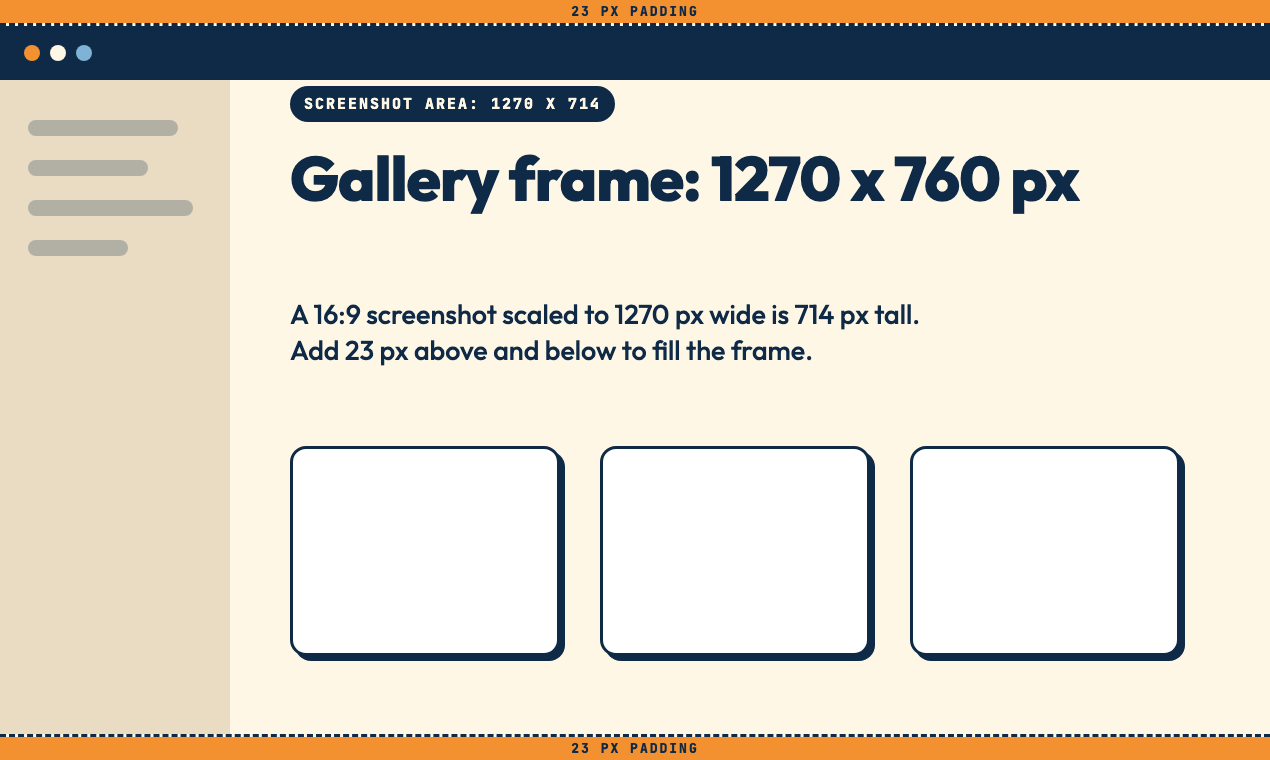
The simplest route in any design tool: create a 1270x760 frame first, drop the screenshot in, and scale it until the important part fills the frame. Export as PNG for interface screenshots so text stays sharp.
What to put in the gallery
Product Hunt's guidance is one sentence long and worth following: "Show the product in use, not just your logo." It suggests screenshots of the core flow, a before-and-after, or a short GIF of the key moment.
A simple order that fits that advice (my suggestion, not a Product Hunt rule):
- 1The result. What the user ends up with.
- 2The core flow. The main screen, mid-task.
- 3The difference. The one thing your product does that the usual alternative doesn't.
Keep any caption text large. A sentence set in small type on a 1270px image is hard to read once the image is shown smaller than full size.
The logo: 240x240, and mind the first frame
The logo is the square image next to your launch on the leaderboard. Product Hunt accepts JPG, PNG or GIF up to 2MB and recommends 240x240px.
Animated GIFs work, with a catch Product Hunt spells out: they "only play on hover, so make sure the first frame looks good on its own." If your animation starts on a blank frame, that blank frame is your logo for most visitors.
The gallery size is not your share image size
The gallery lives on Product Hunt. The image people see when someone pastes your own site's link into X, LinkedIn or Slack on launch day is a different file: your site's Open Graph image, usually 1200x630px. A 1270x760 gallery image reused there gets cropped.
Before launch day, paste your homepage into our free link preview checker to see what the preview looks like now. If it is missing or cropped, the OG image generator makes a 1200x630 one in the browser.
Checklist before you schedule
- At least one gallery image at 1270x760, ideally three or more
- Every image shows the product in use
- Logo at 240x240, up to 2MB, first frame readable
- Name within 40 characters, tagline within 60, description within 500
- Up to 3 launch tags picked
- Video or demo link added, if you have one
With the assets done, the next jobs are the words and the plan: what to write in your Product Hunt first comment and how featuring works on Product Hunt.
When the gallery and logo are ready, you can also launch your product on DivvLaunches. A free listing includes a nofollow link. A First Class listing is $9.99 (checked 17 Nov 2026) and the link is marked rel=sponsored.
FAQ
What size should Product Hunt gallery images be?
1270x760px is the recommended size in Product Hunt's help center (checked 17 Nov 2026).
How many gallery images does Product Hunt require?
At least one. The launch editor lists "3 or more images" under "Make it stand out", so three is a sensible minimum to aim for.
What is the Product Hunt logo or thumbnail size?
240x240px recommended, as a JPG, PNG or GIF up to 2MB. Product Hunt's current help pages call it the logo. Older guides call it the thumbnail.
Can I use a GIF?
Yes for the logo, where it plays only on hover. For the gallery, Product Hunt suggests "a short GIF of the key moment" as one option.
Is 1270x760 mandatory?
Product Hunt calls it the recommended size. The help center does not say other sizes are rejected, and I have not tested what happens to them, so the safe choice is to export at exactly 1270x760.

Divv Saxena
PILOT IN CHIEFFounder & Flight Director
Guiding indie hackers and startup founders through takeoff, daily community upvoting, and verified directory distribution on DivvLaunches.
Ready to launch your product to early adopters?
Join the daily flight schedule on DivvLaunches. Up to 10 free launches take off each day at 00:00 IST (India time), with live upvoting until midnight and a permanent podium for the top 3.
CONTROL TOWER RADAR
More Dispatches from Flight School
Pre-flight manuals, launch day blueprints, and founder growth telemetry.
How to Launch on Product Hunt in 2026 (and Where to Launch Next)
How to launch on Product Hunt in 2026: the current rules (no Launch Now, a one-week account wait, 30-day scheduling), the steps, a check of its link markup, and where to launch next.

Best Time to Launch on Product Hunt (by Time Zone)
You don't pick a time on Product Hunt. Every launch goes live at 12:01 AM Pacific Time on the date you schedule and runs until midnight Pacific. What you pick is the day, and Product Hunt says no weekday guarantees a top spot. Choose the day you can be online for.